
Viglet Dumont: Architecture Overview
Introduction
Section titled “Introduction”Viglet Dumont is a modular data extraction platform that runs connectors independently and delivers indexed documents to a search engine via an asynchronous message queue. It is designed as a companion application to Viglet Turing, but can also deliver content directly to Apache Solr or Elasticsearch.
System Overview
Section titled “System Overview”The system has three layers: content sources on the left, the Dumont pipeline in the center, and search engines on the right.

Each numbered block is detailed in its own diagram below.
① Connectors: How Content Enters the Pipeline
Section titled “① Connectors: How Content Enters the Pipeline”Connectors extract content and feed it into the pipeline. They come in three forms: Java plugins, standalone CLI tools, and the WordPress PHP plugin.

| Type | Connectors | How they connect |
|---|---|---|
| Java Plugins | Web Crawler, AEM, Catalog & JSON API | Loaded into dumont-connector.jar via -Dloader.path, one plugin per JVM |
| Standalone CLI | Database, FileSystem | Separate JARs that connect to a running Dumont instance via REST API |
| PHP Plugin | WordPress | Installed inside WordPress: sends content directly to Turing, bypasses Dumont |
For details on each connector, see Connectors Overview.
② Pipeline Engine: How Content Is Processed
Section titled “② Pipeline Engine: How Content Is Processed”Once a connector produces a Job Item, it passes through a multi-stage pipeline before reaching the search engine.

| Stage | Component | What it does |
|---|---|---|
| ① | Job Item | A single document with fields, an action (INDEX / DELETE), and a locale |
| ② | Processing Strategies | Priority chain: deindex (P10) → ignore rules (P20) → index new (P30) → reindex changed (P40) → skip unchanged (P50) |
| ③ | Batch Processor + Queue | Groups items into batches of 50, sends to Apache Artemis persistent queue |
| ④ | Indexing Plugin | Delivers to Turing (default), Apache Solr, or Elasticsearch |
The Indexing DB stores checksums and status for every processed document, enabling incremental indexing on subsequent runs.
For the conceptual explanation of each stage, see Core Concepts, The Processing Pipeline.
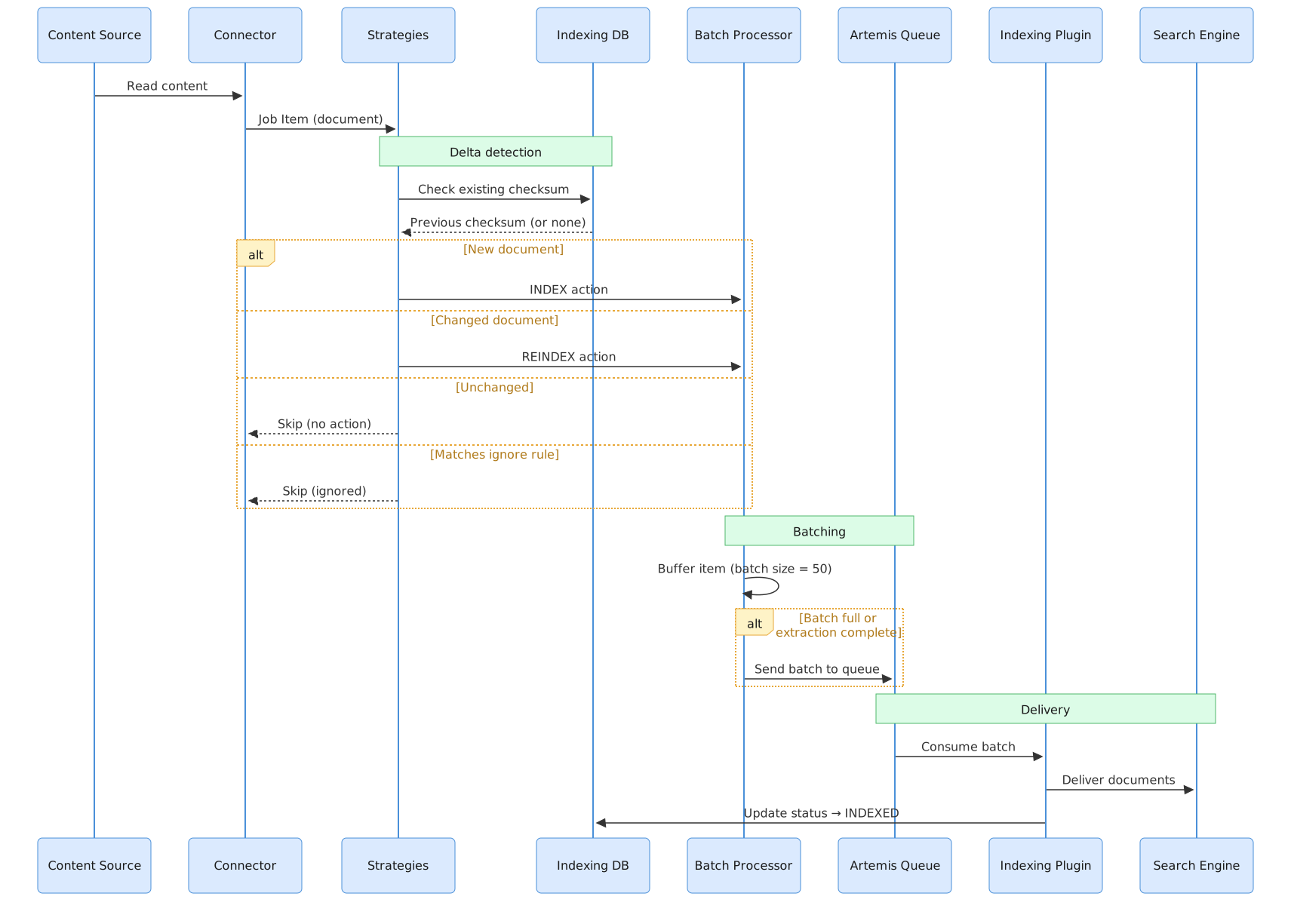
③ Data Flow: Indexing Sequence
Section titled “③ Data Flow: Indexing Sequence”The complete sequence from content source to search engine:
④ Keeping the Index Honest
Section titled “④ Keeping the Index Honest”A pipeline that finished without error is not proof the index is right. A write can fail after the ledger recorded it, a delete can be lost, and a run cut short can make content that was never read look like content that was removed. Dumont treats both halves of that as first-class: it checks its own work, and it refuses to delete on weak evidence.
| Mechanism | What it protects against |
|---|---|
| Content audit | Re-enumerates each source on a cron and files a record for anything never queued |
| Index audit | Compares source, ledger and index, and requeues documents that never landed or whose later write failed |
| Orphan reports | Documents left in the index after leaving the source are written into a dated report you approve, never deleted by the audit itself |
| Safe finish | A run that was interrupted, or where too large a share of extractions failed, finishes standalone: the previously indexed documents are preserved rather than swept |
| Coverage & drift | Per-field fill rates per run, with a warning when a field’s coverage drops between runs: the signal of a layout or selector break |
| Field provenance | Every published field records the strategy and selector it came from, so a value can be traced instead of trusted |
| Indexing log | Every status a document passed through, attributed to the source and run that caused it, so a claim about what happened can be checked rather than believed |
The common rule is that removal is always the conservative branch. A pass that reports nothing, or much less than it should, never becomes a mass de-index, and the one case where deletion is right is routed through a report a human applies.
The same rule governs how these mechanisms report: a failure must never be readable as an
absence. An unreachable indexing log answers 503, not an empty page; a log row that cannot be
parsed costs its own row and is counted in unreadable, rather than emptying the query; and the
log’s status endpoint reports configured and enabled separately, so “someone set the flag”
and “the store answers” cannot be mistaken for each other.
It holds on the way in as well. A row the store refuses to accept is reported at WARN (once per
outage, with a count of what was lost and a line when writes resume) rather than dropped in
silence, so a history that reads short can be told from a connector that was quiet. Those warnings
are deliberately written to the file and the console rather than to the store being complained
about, which is what stops an outage from swallowing the notice of itself.
And it holds for the log that was never switched on. Reading the log and writing it are configured by separate settings, so the status endpoint reports them separately: whether the store is reachable, and whether an appender is attached that would accept a row. A log nothing is writing says so, rather than presenting an empty history as a quiet one.
See Content Audit configuration, the orphan report endpoints and the Logging API.
Internal Module Structure
Section titled “Internal Module Structure”| Module | Package | Responsibility |
|---|---|---|
| Connector Core | connector |
Plugin interface, session management, and REST API controllers |
| Processing Strategies | connector/strategy |
Priority-based chain: index, re-index, de-index, ignore, or skip |
| Batch Processor | connector/batch |
Thread-safe buffer that groups Job Items before queue delivery |
| Message Queue | connector/queue |
JMS listener on Apache Artemis: delegates to indexing plugins |
| Indexing Plugins | connector/indexing |
Output adapters: Turing, Apache Solr, Elasticsearch |
| Web Crawler | web-crawler |
JSoup, URL filtering, authentication, locale detection |
| Database | db |
JDBC queries, batch chunking, multi-database support |
| FileSystem | filesystem |
Apache Tika text extraction, OCR, metadata mapping |
| AEM | aem |
Author servlets (infinity.json, QueryBuilder) or publish delivery APIs (model.json), tags, delta tracking, custom extensions |
| Catalog & JSON API | catalog |
Normalized catalog feeds, and paged JSON APIs run from a manifest (paging, call budgets, incremental expiry) |
| WordPress | wordpress |
PHP plugin inside WordPress: queued indexing with retry, typed fields and facets provisioned in Turing, WP-CLI, and a search block on the Turing JS SDK |
| Commons | commons |
Shared models, interfaces, utilities |
| AEM Commons | aem-commons |
AEM extension interfaces, component extractors, content types and versioned recipes (published to Maven Central) |
| DB Commons | db-commons |
DB extension interface (published to Maven Central) |
| Console | dumont-react |
The web interface: React 19 + Vite, served by the connector and also mountable inside Turing |
Console: two interfaces, both live
Section titled “Console: two interfaces, both live”The console serves every screen at two addresses, and you can use either:
| Address | Interface |
|---|---|
/bento/integration/instance/{id}/… |
A fixed navigation rail, a hub per section, and a ⌘K (Ctrl+K) command palette that jumps to any screen by name |
/admin/integration/instance/{id}/… |
The original interface: a collapsible sidebar |
Every screen that configures or monitors a connector answers at both: the six source
types and their detail forms, AI source inference, indexing rules, the indexing manager,
monitoring, indexing statistics, field coverage, double-check, orphan reports, plugins,
system information and AI insights. Nothing was removed from /admin; a bookmark or a
deep link into it keeps working.
The screens around the connector (sign-in, first-run setup, users, groups and roles, and
your own profile) are served from /admin only.
Both interfaces read the same REST API and show the same data, so switching between them mid-task loses nothing.
Technology Stack
Section titled “Technology Stack”| Layer | Technology | Notes |
|---|---|---|
| Runtime | Java 21 | Minimum supported version |
| Framework | Spring Boot 4.0.3 | JMS, caching, async, scheduling |
| Message Broker | Apache Artemis | Embedded, persistent queues |
| Database | H2 (dev) / PostgreSQL (prod) | Indexing state, checksums, config |
| HTML Parsing | JSoup 1.22.1 | Web Crawler |
| Text Extraction | Apache Tika 3.2.3 | FileSystem: PDF, DOCX, images (OCR) |
| Search Clients | Turing Java SDK, SolrJ 10.0.0, ES Client 9.3.2 | One active per deployment |
| Build | Apache Maven | Multi-module project |
| Console | React 19, Vite, Tailwind CSS v4 | Built into the connector’s static resources |
| Console components | @viglet/viglet-design-system |
Shared with Viglet Turing and Shio, so the three look like one product |
Deployment Topologies
Section titled “Deployment Topologies”Development
Section titled “Development”Dumont (H2 embedded + Artemis embedded) → Turing (http://localhost:2700)Production
Section titled “Production”Dumont + PostgreSQL → Turing + Apache SolrDirect Indexing (without Turing)
Section titled “Direct Indexing (without Turing)”Dumont + PostgreSQL → Apache Solr (direct via SolrJ) → Elasticsearch (direct via ES Client)Related Pages
Section titled “Related Pages”| Page | Description |
|---|---|
| Core Concepts | Pipeline stages, strategies, and change detection |
| Connectors Overview | All connectors and deployment types |
| Indexing Plugins | Turing, Solr, Elasticsearch output targets |
| Installation Guide | Setup with -Dloader.path and systemd |
| Turing: Architecture | Search-side architecture: indexing reception, search flow, and deployment topologies |