
WordPress Connector
The WordPress Connector is a PHP plugin installed inside WordPress, viglet-dumont. It
sends your content to a Viglet Turing Semantic Navigation (SN) site and answers your
site’s search from it.
Requires WordPress 6.6 and PHP 8.1 or later.
How it works
Section titled “How it works”%%{init: {'theme': 'base', 'themeVariables': {'fontSize': '13px', 'primaryColor': '#fff', 'primaryBorderColor': '#c0c0c0', 'lineColor': '#888', 'textColor': '#333'}}}%%
graph LR
WP["📝 WordPress<br/>save / delete"]
Q["🗂️ Queue<br/>one job per post"]
W["⏱️ Worker<br/>WP-Cron or WP-CLI"]
TUR["🔍 Turing<br/>SN site"]
WP -->|"enqueue"| Q
Q --> W
W -->|"POST /api/sn/import<br/>in batches, with retry"| TUR
classDef blue fill:#dbeafe,stroke:#4A90D9,stroke-width:2px,color:#1a1a1a
classDef purple fill:#ede9fe,stroke:#9B6EC5,stroke-width:2px,color:#1a1a1a
classDef green fill:#dcfce7,stroke:#50B86C,stroke-width:2px,color:#1a1a1a
class WP blue
class Q,W purple
class TUR green
- Saving a post never calls Turing. Publishing, updating, unpublishing, trashing or deleting a post only queues one job for it; saving again replaces that job, so the last save wins.
- A worker sends the queue in batches through WP-Cron, or through
wp dumont queue runon hosts that disable WP-Cron. When Turing is unreachable, a job backs off (1 minute, doubling, up to an hour). After 8 failed attempts it waits for a replay. A post Turing refuses is retried on its own, so one bad post does not block the rest of its batch. - Each post records its state: when it was last indexed, its last error and its failed attempts. The post lists and the block editor show it (see Admin).
Install
Section titled “Install”From wp-admin: download viglet-dumont-<version>.zip from the
Dumont releases (tags
wordpress-v<version>) and upload it under Plugins → Add New → Upload Plugin.
With Composer, for a site built in CI or running with DISALLOW_FILE_MODS: declare the
release zip as a package, and composer/installers puts it in the plugins directory.
{ "repositories": [ { "type": "package", "package": { "name": "viglet/dumont-wordpress", "version": "2.0.0", "type": "wordpress-plugin", "dist": { "type": "zip", "url": "https://github.com/openviglet/dumont/releases/download/wordpress-v2.0.0/viglet-dumont-2.0.0.zip" }, "require": { "composer/installers": "^2.0" } } } ], "require": { "viglet/dumont-wordpress": "2.0.0" }}With WP-CLI: wp plugin install <zip URL> --activate.
Then open Viglet Dumont → Setup.
Connect to Turing
Section titled “Connect to Turing”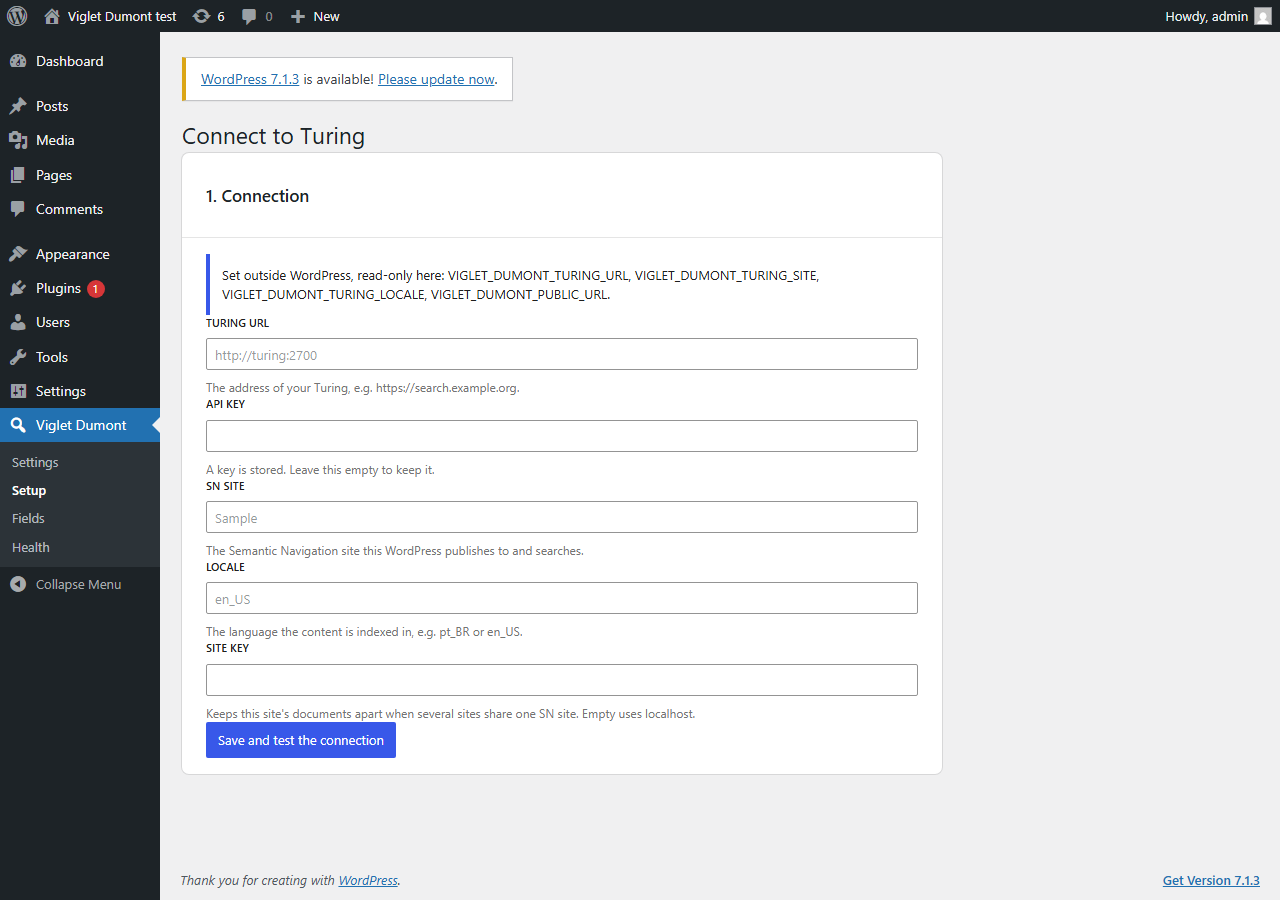
Viglet Dumont → Setup takes the connection, then Save and test the connection checks it one step at a time and stops at the first failure, naming it:
| Step | Fails when |
|---|---|
| Address | The URL is not a full http:// or https:// address |
| Network | The host does not resolve (DNS), the certificate is rejected (TLS), nothing answers in time, or nothing listens on that port |
| Turing | The server answers, but not with Turing’s discovery document (wrong URL, or a proxy in the way) |
| API key | No key is set, or Turing refuses it (wrong, expired, or its user cannot manage SN sites) |
| SN site | No SN site has that name yet; the page offers Create the SN site |
Once every step passes, Index everything now runs the first index with a progress bar.
| Setting | Meaning |
|---|---|
| Turing URL | Turing as this server reaches it, e.g. https://search.example.org |
| API key | A Turing API token (Turing console → API Tokens). It is never shown again after saving |
| SN site | The Semantic Navigation site this WordPress publishes to and searches |
| Locale | The language the content is indexed in, e.g. pt_BR |
| Site key | Starts every document id; see Several sites, one SN site |
From the environment
Section titled “From the environment”A container deploy can set the connection with no wp-admin step. Each of these is read
from a wp-config.php constant or, failing that, an environment variable of the same name.
A value set either way wins over the settings page, shows there read-only, and is
never written to the database, so the API key stays out of database backups.
| Name | Setting |
|---|---|
VIGLET_DUMONT_TURING_URL |
Turing URL, as this server reaches it |
VIGLET_DUMONT_TURING_SITE |
SN site |
VIGLET_DUMONT_TURING_API_KEY |
API key |
VIGLET_DUMONT_TURING_LOCALE |
Locale |
VIGLET_DUMONT_SITE_KEY |
Site key |
VIGLET_DUMONT_PUBLIC_URL |
Turing as visitors’ browsers reach it, when that differs |
wp dumont status prints where each value came from.
What gets indexed
Section titled “What gets indexed”Every post sends a fixed document: id, title, text (the rendered body without
markup, shortcodes or hidden UI text), abstract, url, type, author,
publication_date, modification_date, site, image, site_key, source_apps, plus
categories / section and tags when those options are on. Approved comments and named
custom fields can be added on the Settings page.
Fields and facets
Section titled “Fields and facets”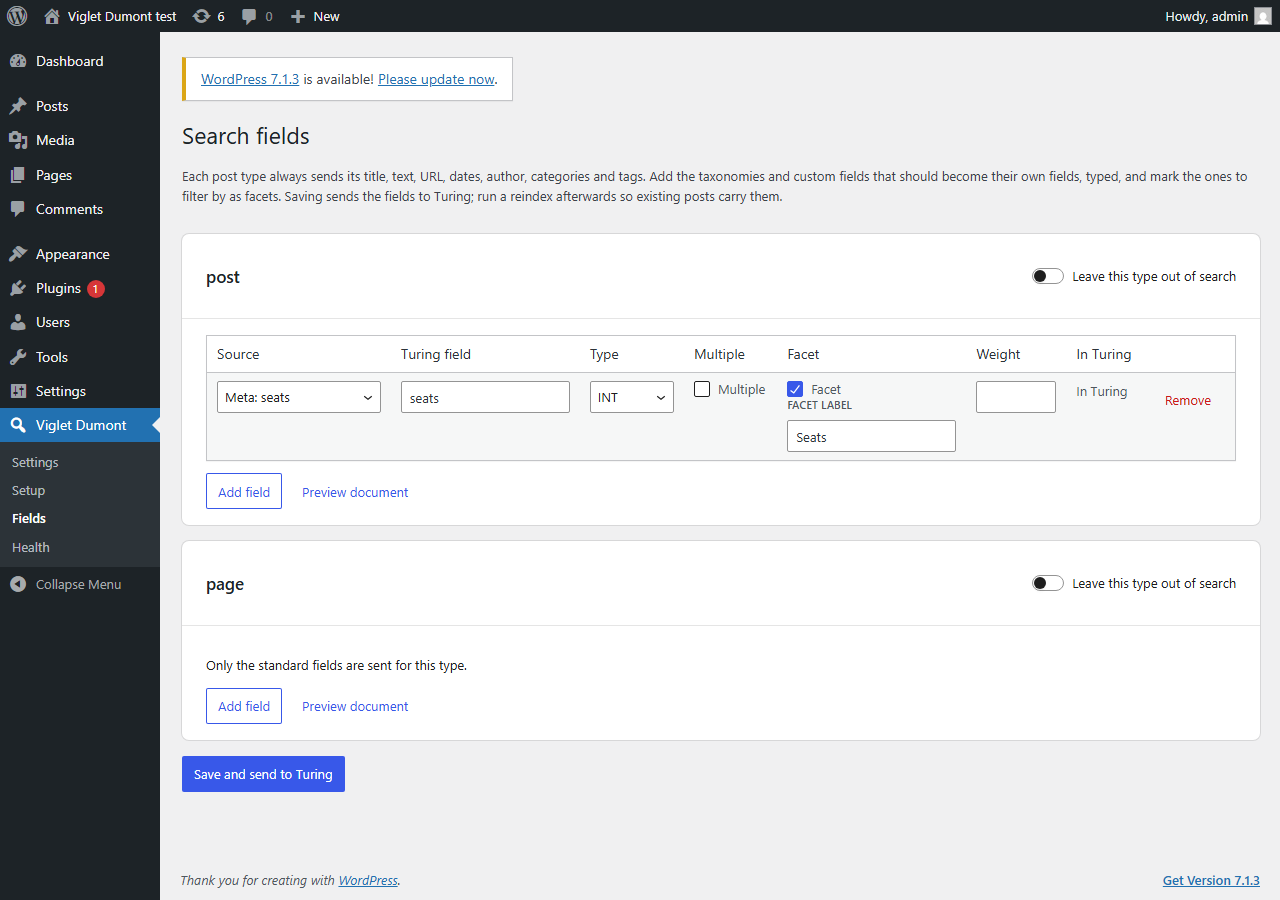
Viglet Dumont → Fields maps, per post type, what else becomes its own Turing field:
- Source: a taxonomy, a meta key the posts actually carry, a post field (excerpt, slug, menu order, parent) or the featured image URL.
- Type:
STRING,TEXT,INT,LONG,FLOAT,DOUBLE,DATEorBOOL. A value that does not convert is left out, never guessed. Dates are read asYmd(ACF), a Unix timestamp, or any datestrtotimereads. - Multiple, Facet with its label, and a Weight (1 to 100) for ranking.
- Ranges, on a
DATEor number field: a range facet as well, provisioned as a Turing custom facet named<field>_range. A date gets a fixed set (upcoming, last 7 days, last 30 days, this year, before this year). A number lists its own ranges, each with a label and a From and To; an empty bound is an open end, and an empty label is written from the bounds (“20 – 50”, “Up to 20”, “50 or more”). - Leave this type out of search switches a whole post type off.
In Turing says where each field stands: In Turing, Added on the next save, or Conflict when Turing already holds the field with another type. Preview document shows the JSON the newest post of the type sends. Save and send to Turing stores the mapping and provisions the fields through Turing’s manifest API, so facets need no console step. Run a reindex afterwards so existing posts carry the new fields.
With nothing configured, every public custom taxonomy is mapped as a facet.
WooCommerce. With WooCommerce active and product among the indexed types, a product
offers its shop fields as sources: Product: Price, Regular price, Sale price,
Stock status, SKU and Average rating. With nothing configured a product sends
its price, its stock as a Stock facet (in the shop’s words, “In stock”), its product
categories and tags, and each global attribute (pa_color, …) as a facet. Turn on
Ranges for the price to filter by “Up to 50”, “50 – 100” and so on. A product whose
stock changes from an order is sent again, although no post was saved.
In the Turing search block a product’s result shows its price in the shop’s currency (the regular price struck through when it is on sale) and an Add to cart button. It adds one through WooCommerce’s Store API without leaving the page, and says whether it worked, with WooCommerce’s reason when it did not (out of stock, say).
The same mapping is readable and writable as JSON at viglet-dumont/v1/mapping. A theme
can map in code with the viglet_dumont_mapping filter, and change a document just before
it is sent with viglet_dumont_document.
Excluding content
Section titled “Excluding content”A post is left out when its type is off, when its ID is in Exclude Posts/Pages
(Settings), or when Exclude from search is on in its editor panel
(_viglet_dumont_exclude meta).
Several sites, one SN site
Section titled “Several sites, one SN site”Document ids are <site key>:post:<post ID>, and every document carries a site_key
field, provisioned as a facet. Several WordPress sites (or the blogs of a multisite
network) can therefore publish into one SN site for a unified search, without replacing
each other’s documents. The key defaults to the site’s host and path
(example.org-projetos); set it in Setup or with VIGLET_DUMONT_SITE_KEY.
Delete All and wp dumont sweep remove only this key’s documents.
WP-CLI
Section titled “WP-CLI”| Command | What it does |
|---|---|
wp dumont status |
Connection, SN site, site key, published versus indexed documents per type, the queue, and where each setting came from |
wp dumont index [--type=<type>] [--ids=<ids>] [--since=<date>] |
Indexes now, synchronously, with a progress bar; exits non-zero when a batch fails. --ids also removes the listed posts that are not published |
wp dumont reindex |
Provisions the fields, indexes every published post, then sweeps |
wp dumont sweep [--dry-run] |
Removes from Turing this site key’s documents that WordPress no longer publishes, e.g. posts deleted while the plugin was off |
wp dumont queue run [--retry-failed] |
Sends the queue now, ignoring backoff, and names each post that failed |
wp dumont queue status |
Lists the waiting and failed jobs with their last error |
The same operations answer over REST under viglet-dumont/v1/: status, index,
sweep, queue/run and queue/retry.
| Screen | What it is for |
|---|---|
| Setup | The connection and its step-by-step test, the SN site, the first index |
| Fields | The per-type field mapping, its state in Turing, a document preview |
| Health | Published versus indexed per type, the queue, its last run, the last 50 events |
| Settings | Post types, categories, tags, comments, custom fields, exclusions, batch size, search |
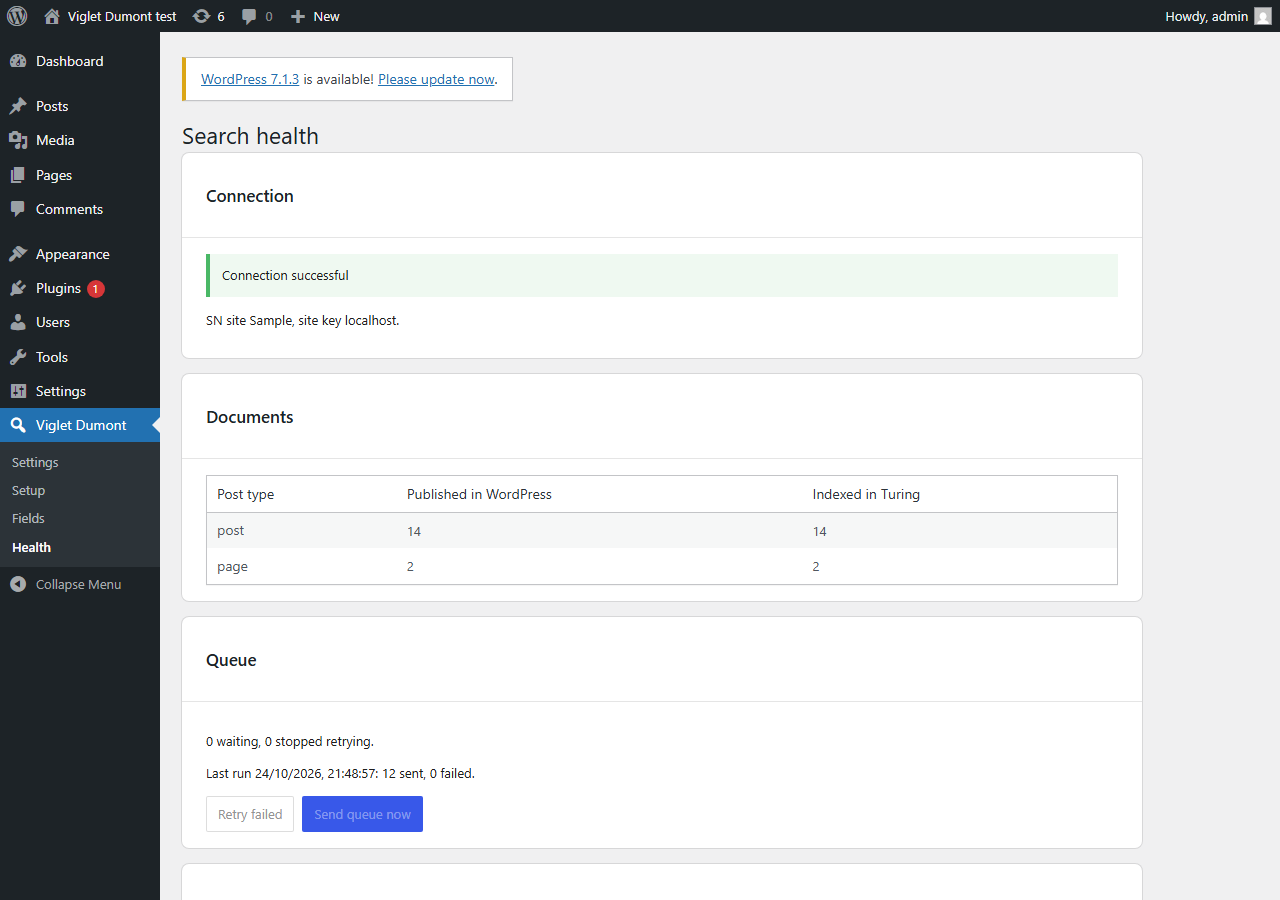
Health has Retry failed and Send queue now, and lists every send, removal, provisioning and sweep with its error when it failed.
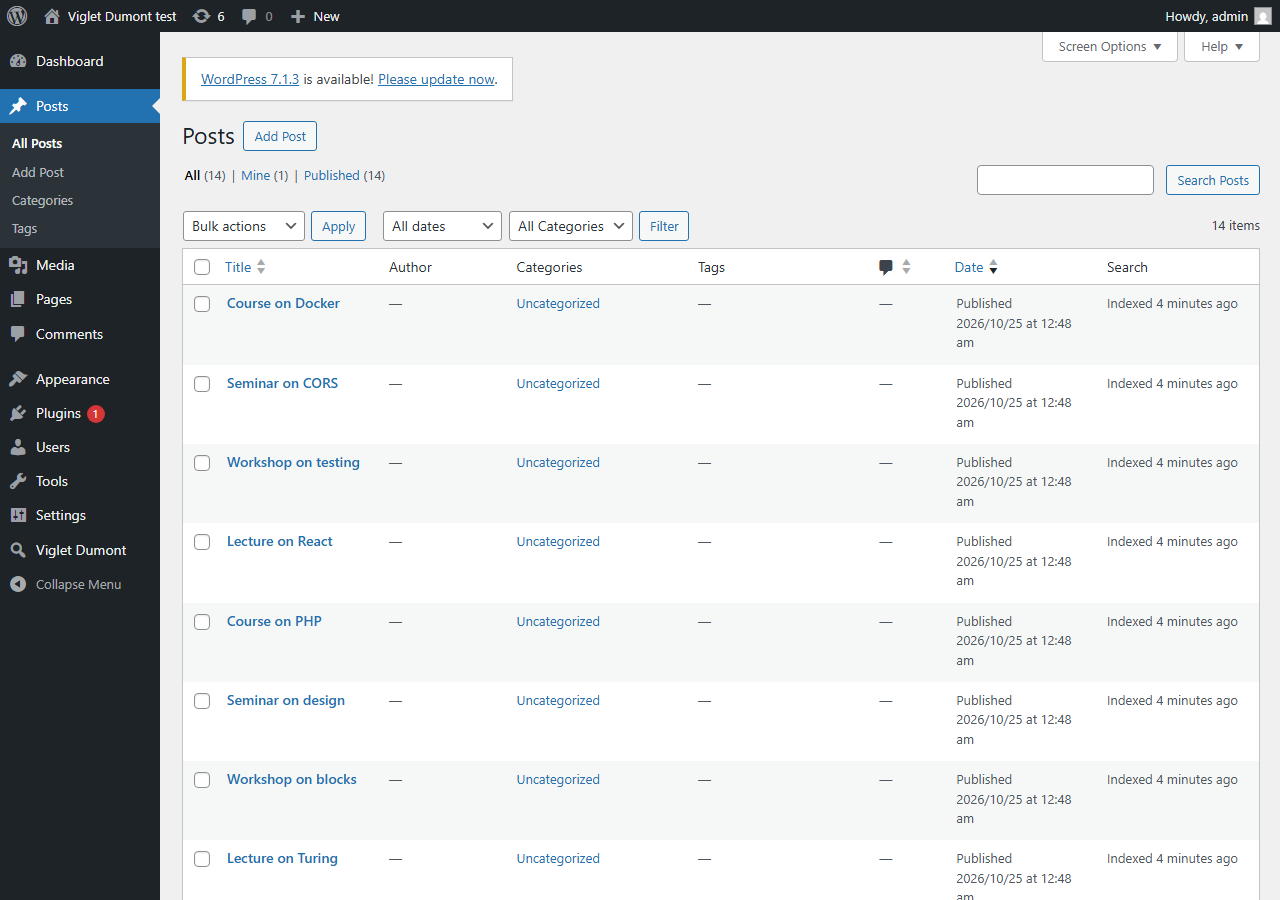
The post lists gain a Search column: Indexed 2 mins ago, Queued, Failed (the error shows on hover), Excluded or Not published. The block editor has a Search panel with the same state, Exclude from search and Reindex now.
The same panel’s Assist section helps while writing, and changes nothing on its own:
- Find related posts lists what may already cover the post (Already covered?) and posts to link to (Link ideas), from Turing’s similar-documents and duplicate searches. A draft not yet indexed is compared by its title. Add a link puts a paragraph with the link after the selected block.
- Draft an excerpt asks Turing’s language model, from WordPress’s server with the stored API key, for a one- or two-sentence excerpt of the saved post, in the site’s language. Use this excerpt fills the excerpt field; the post changes only when you save it. Draft another asks again. Turing needs a default language model for it.
Viglet Dumont → Insights shows what visitors searched for in the last 24 hours, 7 days, 30 days or all time, read from Turing’s search metrics with the stored API key: the top searches with their clicks and click-through, the searches that found nothing (with when they were last made), and the ones that found results nobody opened. Each of those last two offers Write about this, a new draft titled with the search, and a search that found nothing also offers Add a synonym, which opens Tuning with it typed in. Searches the block makes while the visitor is still typing are left out. The dashboard’s Site search this week widget shows the week’s five top searches and five that found nothing.
The admin ships in English and Brazilian Portuguese.
Search
Section titled “Search”Replace WordPress search with Turing (Settings → Search) is off on a fresh install. With it on, the results page is the theme’s own: Turing answers WordPress’s main search query and the theme’s search template renders the results, so a block theme keeps its header, footer and styles. Only this site key’s documents come back. If Turing does not answer, WordPress searches its database as before. The plugin’s older results page (with facets, for classic themes) remains available as Results page → The plugin’s results page.
The Turing search block
Section titled “The Turing search block”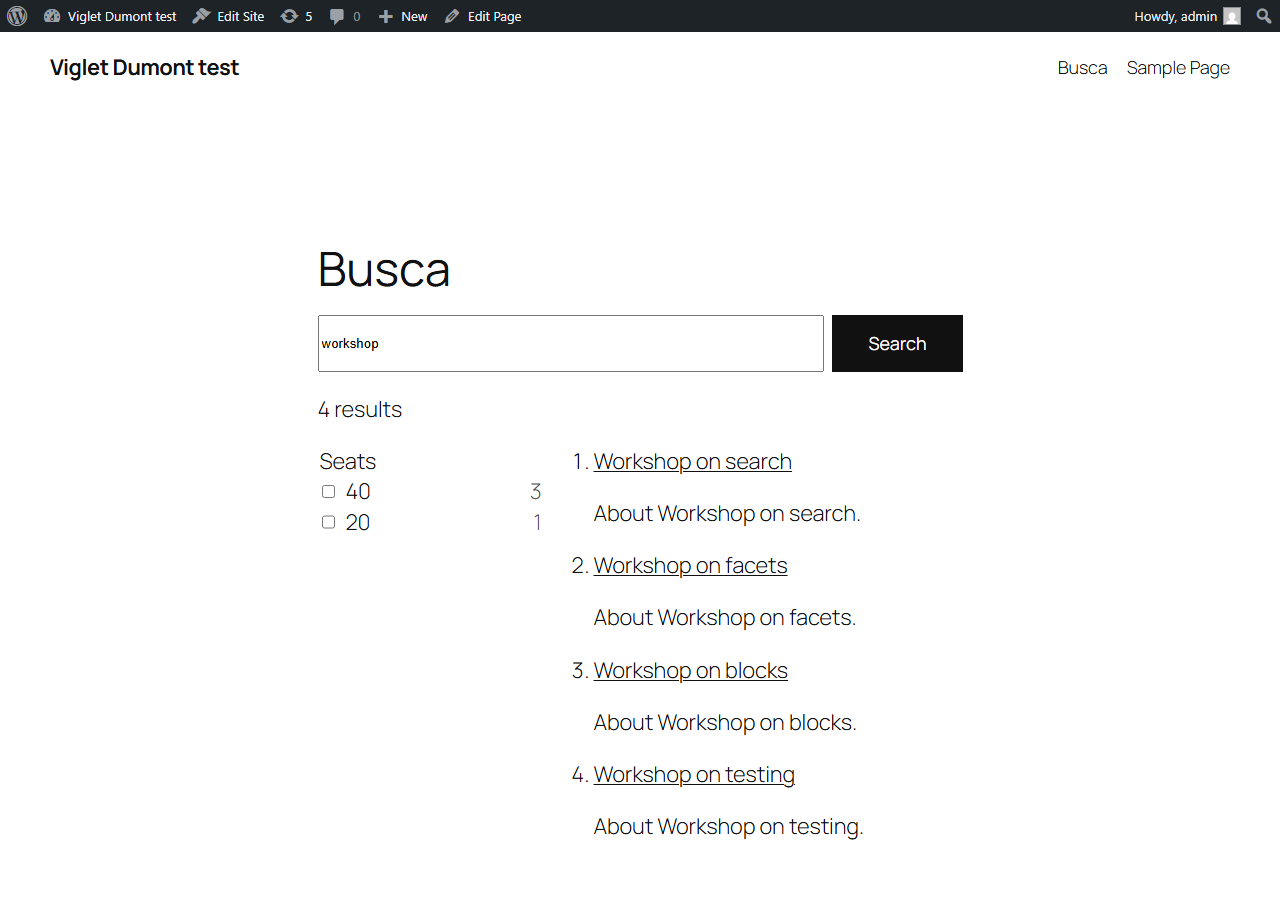
The Turing search block is a complete search UI for any page. It has a box with
suggestions, “did you mean”, the mapped facets, results and pages. It is built with the
Interactivity API on Turing’s JS SDK and takes its colours and type from the theme. It
reads ?q= (or ?s=), so a page holding it can serve as the site’s search page.
With Suggest the filters a sentence names on, a search that reads as a sentence (“posts about php from last year”) also asks Turing’s natural-language filters which filters it names. The ones Turing checked against the site, on a mapped facet or on the post type or publication date, show as chips under the box; a click applies one and takes the words it was read from out of the query. Nothing is applied without a click. Each sentence is an LLM call, and with no language model in Turing nothing is offered.
A site with its own search blocks turns the block off:
add_filter( 'viglet_dumont_register_blocks', '__return_false' );Building your own search on the SDK
Section titled “Building your own search on the SDK”The plugin registers @viglet/turing-sdk
as WordPress script modules, so a theme imports it instead of bundling a copy:
@viglet/turing-sdk: the SDK as published;viglet-dumont/search: the SDK already configured for this site, with searches filtered to its site key.
// A theme module registered with 'viglet-dumont/search' as a dependency.import { createSiteSearch, createSiteAutoComplete, config } from 'viglet-dumont/search';
const search = createSiteSearch();      // search-only; { controller: { chat: true } } adds answerssearch.subscribe( ( state ) => render( state ) );await search.searchQuery( 'workshop' );
The configuration it reads is public and holds no key: Turing’s public URL, the SN site,
the locale, the site key and the mapped facets. PHP reads it with
viglet_dumont_public_config(), and anything else with
GET /wp-json/viglet-dumont/v1/public-config.
Try it locally
Section titled “Try it locally”The plugin’s source, wordpress/
in the Dumont repository, has a Docker stack for trying it end to end. run-docker.cmd
starts WordPress, MariaDB, a WP-Cron runner and a local Turing, creates the SN site, gives
the plugin an API key, and builds the admin screens. WordPress is then at
http://localhost:8080 and Turing at http://localhost:2700.